Since UNBOUND, the question we hear most from clients isn't "should we use AI?" It's "which of these AI things do we actually have, and do we need to upgrade to get the rest?" That's fair. HubSpot now has Breeze Assistant, Agent Hub, Agent Builder, agentic workflows, prebuilt agents and a credit system that pays for all of it, and the names overlap.
Here's how we explain the difference at Pivot, what each one needs, and how we decide whether a tier upgrade is worth it for a client.
What's the difference between Breeze Assistant, Agent Hub and Agent Builder?
The simplest way to think about it: Breeze Assistant is something you talk to, Agent Hub is where your agents live, and Agent Builder is where you make new ones.
- Breeze Assistant is the AI helper inside HubSpot. You ask it questions about your records, have it draft emails, summarize deals and, since the fall release, take actions and run prompts on a schedule. It works for one person at a time, when that person asks.
- Agent Hub is the control center for agents: the prebuilt ones (like Customer Agent and Prospecting Agent) and any custom ones you build. It's where you turn agents on, manage them and see what they're doing.
- Agent Builder is where you create a custom agent for your own process, with a goal, the tools it can use and the knowledge it should draw from. You open it from Agent Hub.
The practical difference is who starts the work. Breeze Assistant waits for a person to ask. Agents built and managed in Agent Hub do a defined job on their own, every time the conditions are met.
Which HubSpot tier do you need for each?
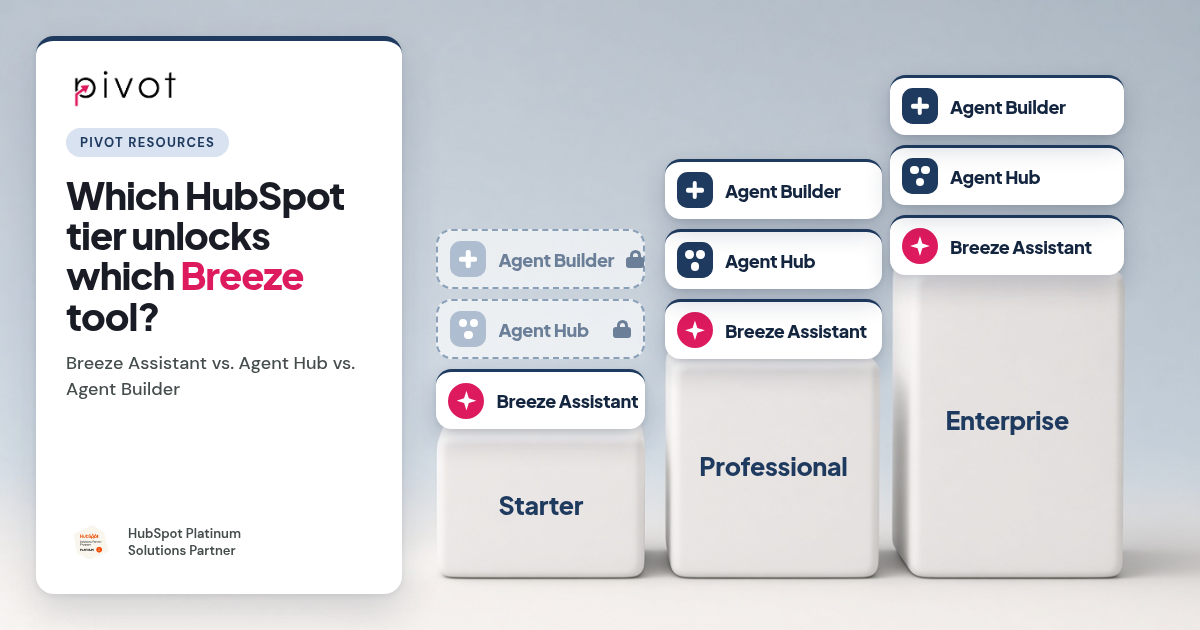
HubSpot's Fall 2026 developer changelog is clear on the main line: Breeze Assistant is available across all hubs and tiers, while Agent Hub and Agent Builder require Professional or Enterprise.
| What it's for | Who starts the work | Tier | |
|---|---|---|---|
| Breeze Assistant | Answering questions, drafting, quick actions and scheduled prompts | A person asks | All hubs and tiers |
| Agent Hub | Turning on, managing and monitoring agents | Agents run on their own | Professional or Enterprise |
| Agent Builder | Building custom agents for your own process | You design it once, then it runs | Professional or Enterprise |
Two things to keep in mind:
- Tier isn't the only gate. AI features use HubSpot credits, and how many you get depends on your plan. A portal can have the right tier and still run out of credits halfway through the month because a few busy workflows used them up.
- Several pieces are still in beta. Using Breeze Assistant to help you build an agent inside Agent Builder is in public beta, for example. Beta features change, so we test them with clients before anyone depends on them.
What can Breeze Assistant do on Starter?
More than most Starter customers use. Since the fall release, Breeze Assistant can take actions rather than only answer, and it can run a prompt on a daily, weekly or monthly schedule and drop the result into your chat list. For a small team, that covers a lot of what people imagine an "agent" doing:
- a Monday summary of open deals past their close date
- a weekly list of new contacts missing an owner
- a monthly recap of closed-won deals by source
Before a Starter client asks us about upgrading for AI, we suggest using scheduled prompts for a month. If the team stops reading the summaries, an upgrade won't fix that. If they start asking for the next step to happen automatically ("don't just tell me the deal is stale, nudge the rep"), that's the signal you've outgrown what Breeze Assistant alone can do.
When does Agent Hub and Agent Builder justify an upgrade?
In our experience, the upgrade pays off when three things are true:
- The job repeats and follows rules. Qualifying every new contact against your ICP, routing tickets, chasing missing data on deals. If a person could write the steps down, an agent can follow them.
- The data the agent reads is in good shape. An agent working from three versions of Lead Source gives three kinds of answers. We cover how to check this in our HubSpot agent readiness checklist.
- Someone owns it after launch. Agents need their knowledge and instructions kept current. The most common problem we're called in to fix is a Customer Agent that went live and then nobody updated it.
If one of those is missing, a tier upgrade tends to disappoint. Teams pay for Professional or Enterprise expecting automation, then find the agent can't do much with the data it has, or nobody has time to set it up. That's not a HubSpot problem. It's a planning one.
Why do HubSpot upgrades often miss the automation teams expected?
Here's what we see most often when a client tells us their upgrade "didn't do anything":
- Nobody mapped the workflow first. The upgrade was bought for a feature, not for a specific process. Start with the process, then check which tier supports it.
- The setup work was underestimated. Agents, workflows and reporting don't build themselves. Budget the setup time alongside the license.
- Integrations get in the way. If another system overwrites the fields an agent depends on, the agent works from data that keeps changing under it. We explain why in Why Custom CRM Integrations Break HubSpot Reporting.
- Old connections are still running. If your integrations use legacy private apps, plan that migration alongside any agent project. See HubSpot Legacy Private Apps Are Going Away.
What about agentic workflows and connecting outside tools?
HubSpot now lets you build agentic workflows with Breeze Assistant's help, including turning a workflow you already run into an agentic one, so a step can be handed to an agent instead of following fixed rules. Our advice: convert one workflow you understand well, compare the results for a few weeks, then decide whether to do more. And apps can now make their own tools available inside HubSpot's agents through Agent Builder. That matters if you rely on tools outside HubSpot: over time, more of them will be usable from inside an agent rather than through a separate integration.
Where Breeze stops, we build custom agents that read your HubSpot data, apply your rules and write the result back into HubSpot. We wrote about that approach in Designing Breeze AI on a Real HubSpot Backbone.
How we help clients decide
When a client asks whether to upgrade for AI, we work through it in this order:
- List the jobs. Write down the three to five tasks you want AI to take off people's plates.
- Match each job to a tool. Can Breeze Assistant do it on request or on a schedule? Does it need a prebuilt agent? Or a custom one?
- Check the data each job depends on. Fix that first. Our free, read-only HubSpot portal audit gives you a health score and the issues to fix first.
- Estimate credits. Look at how much of your monthly allowance you use today and what the new jobs would add.
- Then decide on the tier. If only one job needs Agent Hub, a custom agent outside HubSpot can sometimes cost less than upgrading every seat.
When should you bring in a HubSpot partner?
We'd suggest outside help if:
- you're about to upgrade a tier mainly for AI and haven't mapped which jobs it will handle
- you've already upgraded and the agents aren't doing what you expected
- your credits run out every month, or go unused
- the job you need is something prebuilt agents don't cover
Pivot has been a HubSpot partner since 2014 and is a Platinum Solutions Partner. Our HubSpot AI enablement work covers Agent Hub, Breeze and custom agents, and our HubSpot Admin Subscription keeps agents, data and integrations maintained after launch. If you're not sure where to start, talk to us before you upgrade.
