
A founder recently posted on LinkedIn that he had cancelled his company's HubSpot subscription, and he asked what CRM everyone else uses. More than 500 comments later, the thread had turned into a debate about low-cost CRMs versus value. Dozens of vendors pitched cheaper alternatives, consultants offered to build custom systems, and a smaller group made the point that every CRM costs money, so the real question is what you get for it.
That last group is closest to the conversation I have with teams. Affordability matters. But the question I hear most isn't "what's cheaper?" It's "are we getting full value from what we already have?"
That is the better question, especially now. HubSpot has been explicit about what the platform is becoming.
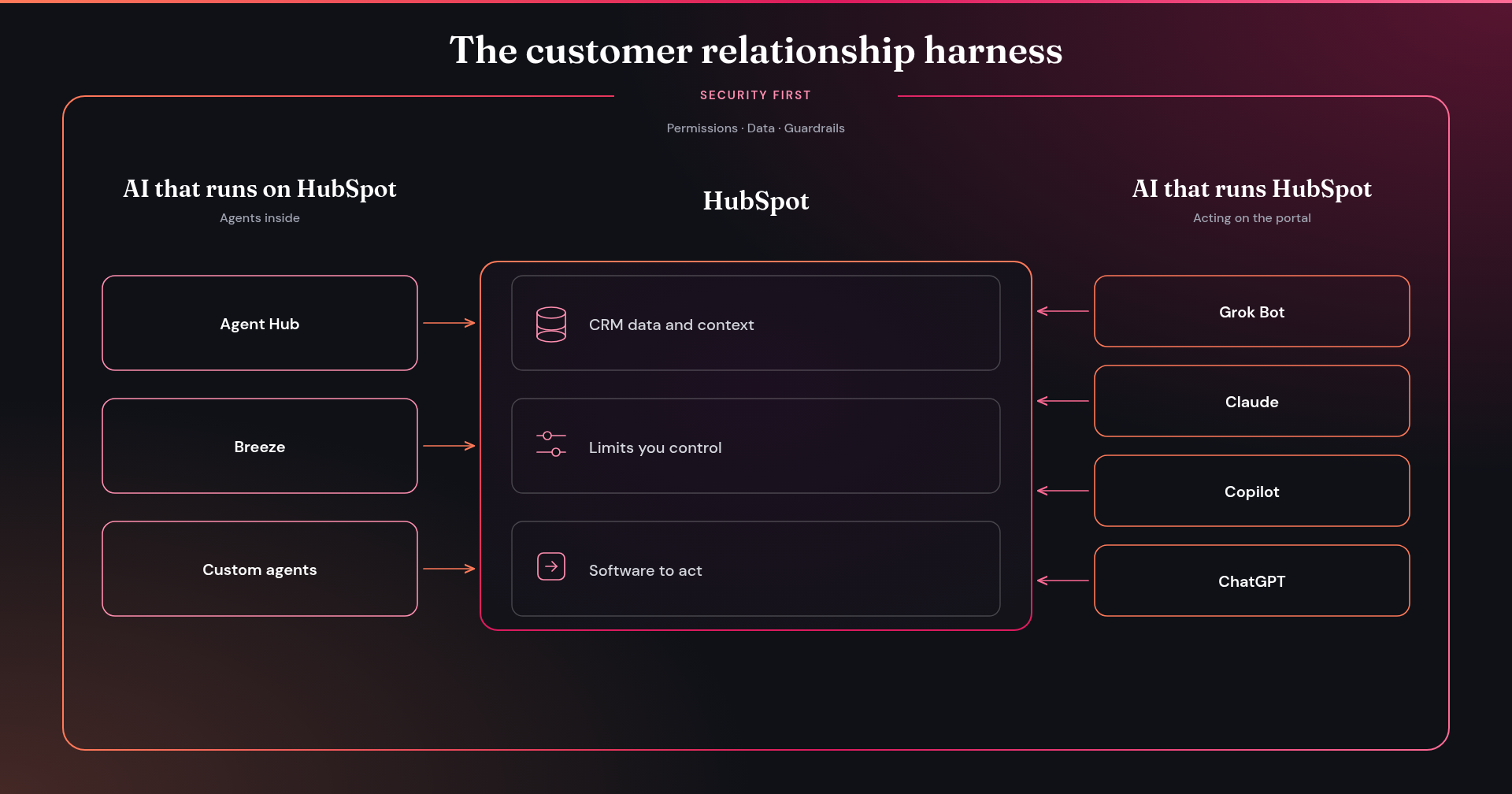
HubSpot was built as a harness for AI
On its homepage, under the headline "Introducing the Customer Relationship Harness," HubSpot now describes itself this way:
HubSpot is the harness that gives your AI what it needs to build better customer relationships. Whether you’re working in HubSpot or tools like Claude or ChatGPT, it provides customer data and context, limits you control, and the software to act. So your marketing, sales, and customer service actually drive growth.
— HubSpot
That's the idea I want to sit with. A harness is what lets AI do actual work, not just generate text. It gives the model your customer data and context, the limits you set, and the ability to act. Pivot has been a HubSpot Solutions Partner since 2014, now Platinum, and this is how we talk about the platform too: AI that runs on HubSpot, and, more importantly, AI that runs it.
AI that runs on HubSpot is the agent layer inside the platform. Agent Hub is included with Starter, Professional, and Enterprise. You can start with HubSpot AI agents, such as Prospecting Agent and Customer Agent, or build custom agents in Agent Builder and run them from Breeze Assistant, a workflow, or a CRM card. They work on your live CRM data, which is the point, and also the risk. An agent pointed at messy lifecycle stages will scale the confusion faster than a human would. Clean the data first, and write the agent a job description, before you let it loose. I walk through that work in Designing Breeze AI on a Real HubSpot Backbone.
AI that runs HubSpot is the open side: the API and HubSpot MCP, plus HubSpot's connectors for Claude, ChatGPT, Gemini, and Copilot. A tool you already use can read and write CRM records and do everyday work without your team living in another tab. HubSpot has said that every seat includes enough headless access for everyday work in Claude or ChatGPT, at no additional cost. Heavier, governed agent usage can run on credits.
Security has to come first. This is non-negotiable for me, and it is the "limits you control" part of the harness. Super Admins can control which AI features are on, and which data they can use — CRM data, customer conversation data, and files — and opt out of having customer data used to train HubSpot's models. The MCP connection uses OAuth, and actions follow your existing user permissions. If sensitive data is turned on, activity objects are blocked from the MCP server. Connect Claude, yes. Do not hand a model a wide-open key and hope for the best.
Used this way, HubSpot is the data backbone, and the agents — yours or someone else's — sit on top. That is how you get far more value out of the platform you already have.
Are you leaving value on the table?
If the value feels lower than it should, look at the portal before you look at the market.
More often than not, I walk into accounts with hundreds of workflows, many of them throwing errors, and nobody remembers why they were built. The data model grew by accretion: too many properties, no agreement on lifecycle stages, custom objects that nobody owns. Integrations write over each other. Reports exist, and nobody believes them. When that's the case, the value is not missing from the software. It's locked up in the implementation.
A lightweight system built with Claude can work for a tight group with a simple motion. I get wary of that advice once the team is more than a handful of people. The hard parts of a CRM — de-duplication, consent, permissions, associations, a data model that still makes sense at quarter-end — are also what make the harness work. If the data is a mess, the agents inherit the mess.
If we turned on the automation, reporting, and objects you already have, cleaned the data they run on, and then put agents to work with the right limits, would you still feel like you were leaving value behind? If the answer is "I don't know," find out.
Get more from what you already have
It's easy to pay for a platform that's giving you value. The opportunity I see more often is a chance to get more out of HubSpot with what's already in the account.
Seats. Start with who actually logs in, and who should. People leave, change roles, or were never really invited into the work the portal is supposed to do. HubSpot has Core seats for full access, and view-only seats at no additional cost for people who need to see the data and not edit it. Get the right people into the system. Seats no one will use can be put toward the AI layer instead.
Did you know you can trade unused Core seats for HubSpot Credits? A Super Admin can swap unassigned seats for credits right from Account & Billing, and the seat's value goes toward credits that power agents and AI features. Two catches: credits can't be swapped back into seats, and unused credits expire at the end of each month. Swap only the seats you're sure you won't need.
Features already in your plan. Whether you're on Starter, Professional, or Enterprise, there's a good chance the plan includes tools your team hasn't turned on yet. The exact list depends on the subscription, but the pattern is the same: the capability is already there, and it isn't doing any work. If something was scoped for a pilot and never became a habit, that value is still sitting in the account. Agents and some AI features run on HubSpot Credits. Point them at work that matters.
Marketing contacts. Point them at the people you actually want to reach. The contacts you market to should be the buyers and prospects you're really engaging, so your reports and send health reflect that audience — not a leftover list from a campaign that ended last year. Old lists and workflows can keep treating people as marketing contacts long after the work is done. Review who you're actually talking to, and keep the list pointed at real buyers.
Frequently asked questions
What is the HubSpot customer relationship harness?
HubSpot now describes itself as the harness that gives your AI what it needs to build better customer relationships. A harness is what lets AI do actual work, not just generate text. It provides customer data and context, the limits you control, and the software to act — whether that's HubSpot AI agents inside the platform, or tools like Claude and ChatGPT acting on the portal.
Is it safe to connect Claude or ChatGPT to HubSpot?
It can be, if you set the limits first. Super Admins can control which AI features are on and which data they can use — CRM data, customer conversation data, and files — and opt out of having customer data used to train HubSpot's models. HubSpot MCP uses OAuth, and actions follow your existing user permissions. If sensitive data is turned on in the account, activity objects are blocked from the MCP server. Connect Claude, yes. Do not hand a model a wide-open key and hope for the best.
Can I trade unused seats for HubSpot Credits?
Yes. A Super Admin can swap unassigned Core seats for HubSpot Credits from Account & Billing, and the seat's value goes toward credits that power agents and AI features. Credits can't be swapped back into seats, and unused credits expire at the end of each month. Swap only the seats you're sure you won't need.
What does a HubSpot Value Audit cover?
It starts with a 15-minute call about your portal. I'll tell you where it has value it isn't using yet, and where AI can safely take on work — including the data, the agent layer, the permissions, and whether what you're already set up with is pointed at the work that matters.
The HubSpot Value Audit
Pivot has been a HubSpot Solutions Partner since 2014, now Platinum. We work with teams in the US and Canada on the unglamorous work that makes the platform pay off: data architecture, integrations, and AI that runs on HubSpot and runs HubSpot, with security first.
Book a 15-minute HubSpot value check. I'll tell you where your portal has value it isn't using yet, and where AI can safely take on work.
Not ready for a call? Run the free Instant Audit first.